Training a "hey claude" wake word on a rented L40 with Space Bunny Alpha
Training a custom openWakeWord model on a rented L40, driven by the OpenRouter stealth model Space Bunny Alpha. 77 minutes, $1.13.

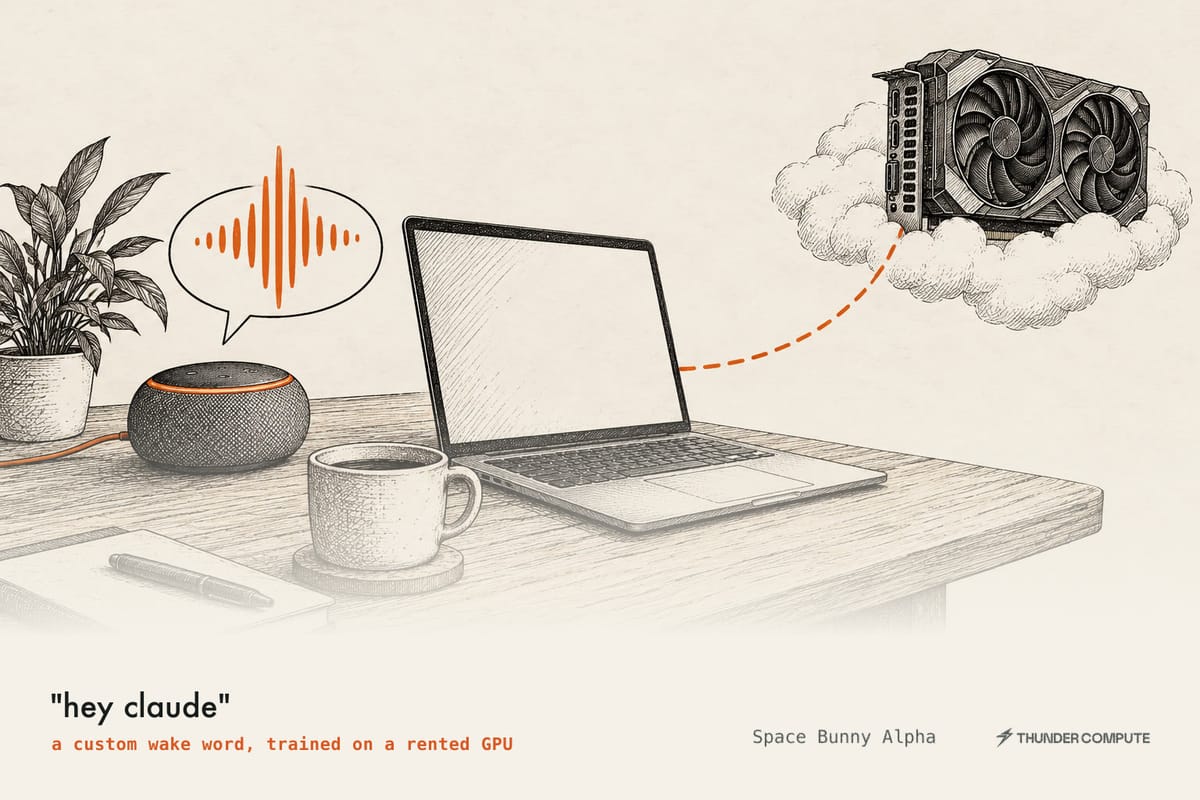
I run a small voice agent on my Mac that listens for a wake phrase with openWakeWord, transcribes speech locally, and hands the text to a coding model. The built-in "hey jarvis" model works fine, but I wanted "hey claude", and since nobody publishes one I had to train it myself. Training needs a CUDA GPU, which my M1 doesn't have, so I rented one for an evening and used the run to try Space Bunny Alpha, a new stealth model on OpenRouter, as the agent that drove the training.
What a stealth model is
OpenRouter sometimes lists a lab's model under a codename before the lab announces it, and these are called stealth or cloaked models. The model is real and callable, but the listing doesn't say who made it, and access is usually free while it stays cloaked because the lab wants real traffic to see how the model behaves before release. Some have been named later: Quasar Alpha and Optimus Alpha turned out to be GPT-4.1 builds, Polaris Alpha was an early GPT-5.1, and Ox Alpha was GLM-5.3-Flash. Others were never identified.
The trade-off is data handling, since each stealth listing sets its own retention terms. Space Bunny's says prompts and completions may be retained by the provider but are not used for training. Because the provider is anonymous, I treated everything I sent it as public and gave it only public information.
Space Bunny Alpha
Space Bunny Alpha (stealth/space-bunny-alpha) appeared on OpenRouter on September 23, 2026, and OpenRouter announced it as a "flash" model: fast inference, strong coding, and native text, image and video input. It has a 1M-token context window, up to 524K output tokens, tool calling, structured output, and reasoning effort adjustable from low to max. It always reasons to some degree. It costs $0 for input and output.
The launch was a little rough, since OpenRouter took the model offline on its first day while the provider fixed an issue on their side, but it has been reachable since. OpenRouter's page shows a median of about 62 tokens per second with 1.5 seconds of latency, and its stealth page shows 21.4 trillion tokens of usage so far. It is also offered free inside opencode for a limited time, through a separate route that opencode says has zero retention.
Nobody has confirmed who makes it. When asked, it has told testers it is GPT-5 from OpenAI, but models repeat what's in their training data, so that says little. One independent analysis found that its token counts match MiniMax models far more closely than OpenAI's, which is better evidence but still only circumstantial. Early reviews rate it well for turning sketches and screenshots into working front-end code and weaker at physics simulation.
The best single page on it is spacebunnyalpha.com, an independent field guide that isn't affiliated with the provider. It ran its own subset evaluations, which put the model at 82% on GPQA Diamond, 75% on MMLU-Pro and 46% on Humanity's Last Exam, and it asked the model to draw an astronaut bunny as SVG code. This is what Space Bunny drew:

SVG drawn by Space Bunny Alpha, from spacebunnyalpha.com's SVG lab.
I ran it inside opencode, a terminal coding agent that talks to OpenRouter directly.
The GPU
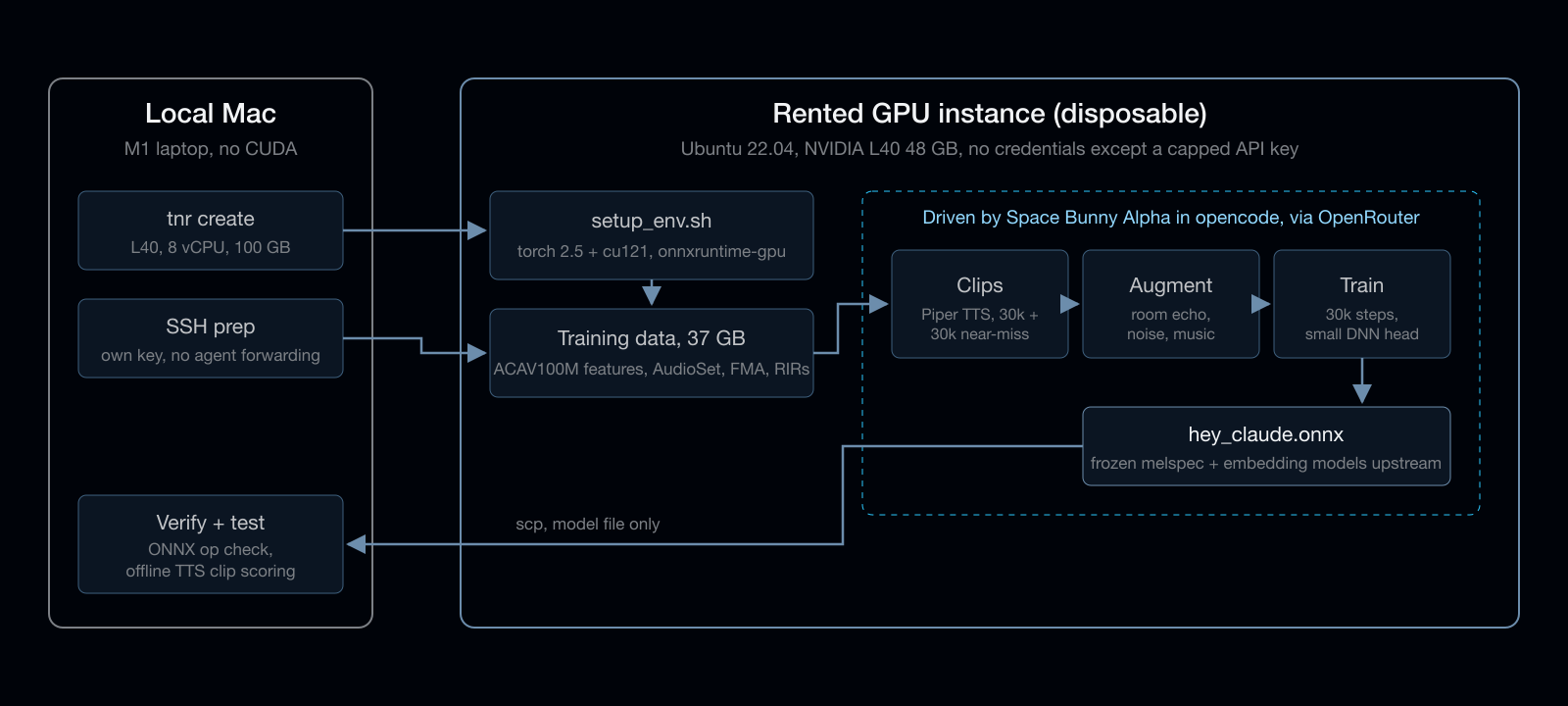
I used Thunder Compute, whose RTX A6000 costs $0.35/hr. That night it was sold out, and third-party stock trackers had shown it out of stock for about a week, so I took an L40 (48 GB, Ada) with 8 vCPUs and a 100 GB disk at $0.87/hr instead. Billing is per minute, so I set a hard time budget and had the agent track elapsed time against it.
Creating the instance from the tnr CLI takes one line:
tnr create --gpu l40 --num-gpus 1 --vcpus 8 --template base --disk 100
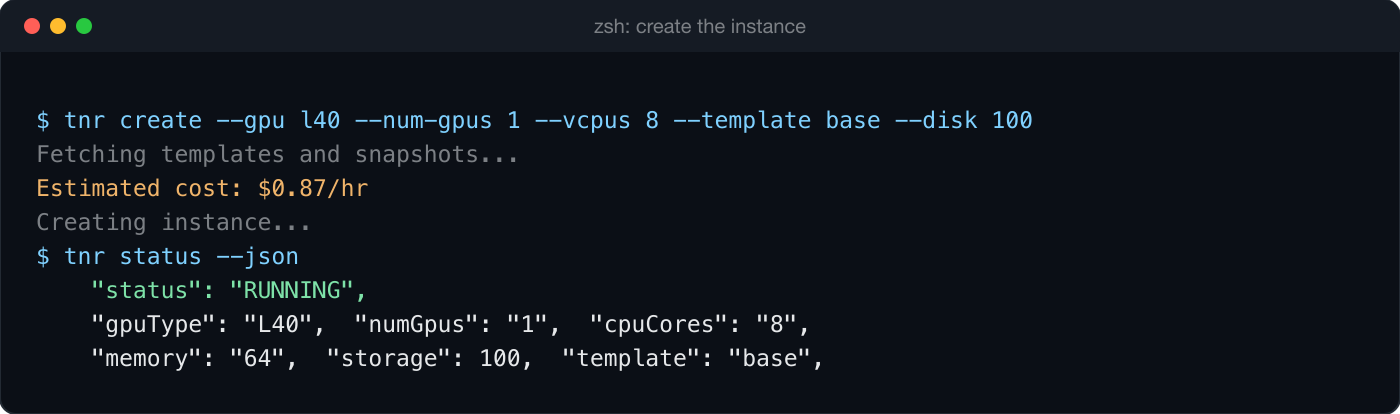
The SSH config that tnr writes uses a per-instance key and sets IdentityAgent none, so your local SSH agent can't be forwarded to the box. That matters here, because the machine runs an anonymous model with shell access and shouldn't have any path back to the rest of my network.
Sandboxing the agent
The rented box was the sandbox: it held nothing of mine and was deleted as soon as the job finished.
- It had no personal keys, configs or synced folders, and I checked the environment for stray credentials before handing it over.
- Its only credential was an OpenRouter key with a spending limit of a few dollars.
- The agent was told to download only public code and data, and never to upload anything, open ports or install tunnels.
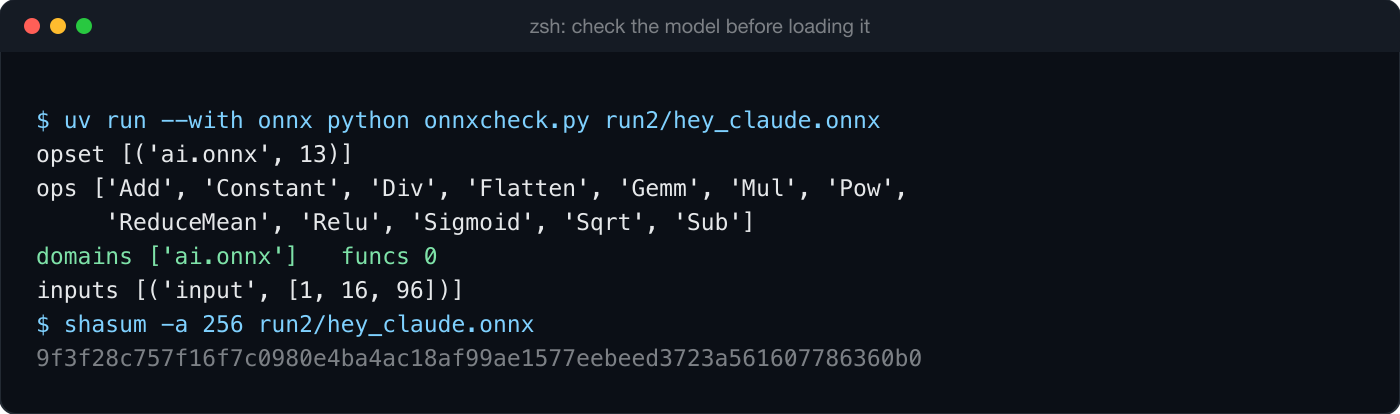
- Only the model files and plain-text logs came back. Before loading a model, I checked that its graph used only standard ONNX operators (Gemm, Relu, Sigmoid and basic arithmetic, opset 13) with no custom domains or embedded functions. Both files are about 200 KB.
The training recipe
The upstream openWakeWord training notebook no longer runs as written, because its dependencies have drifted and some of the datasets it pulls have moved. I used Dethon/openwakeword-training instead, a maintained local port with documented patches and stages that resume after a failure.
On a clean Ubuntu 22.04 image it still needed three fixes:
build-essentialandpython3.10-dev, becausewebrtcvadcompiles from sourcegit-lfs, which the download script callspyarrowin the venv, which the download script imports but setup doesn't install
Datacenter bandwidth kept the data step short. All 37 GB, made up of ACAV100M negative features, four AudioSet shards, about four hours of FMA music and a set of room impulse responses, downloaded and unpacked in about 9 minutes.
I borrowed one idea from maxwhipw/marmalade-openwakeword, which is to train against phrases that sound close to the wake word. The config's custom_negative_phrases got 29 near misses, including "hey cloud", "hey clawed", "hey Claudia", "okay Claude" and "say Claude", so the model learns the boundary it actually has to draw.
What the agent did
I gave Space Bunny a written brief with a time budget, report points and the rules above, and it worked through the stages on its own. It verified the config key against upstream train.py instead of guessing, then generated the clips with Piper TTS, augmented them and trained.
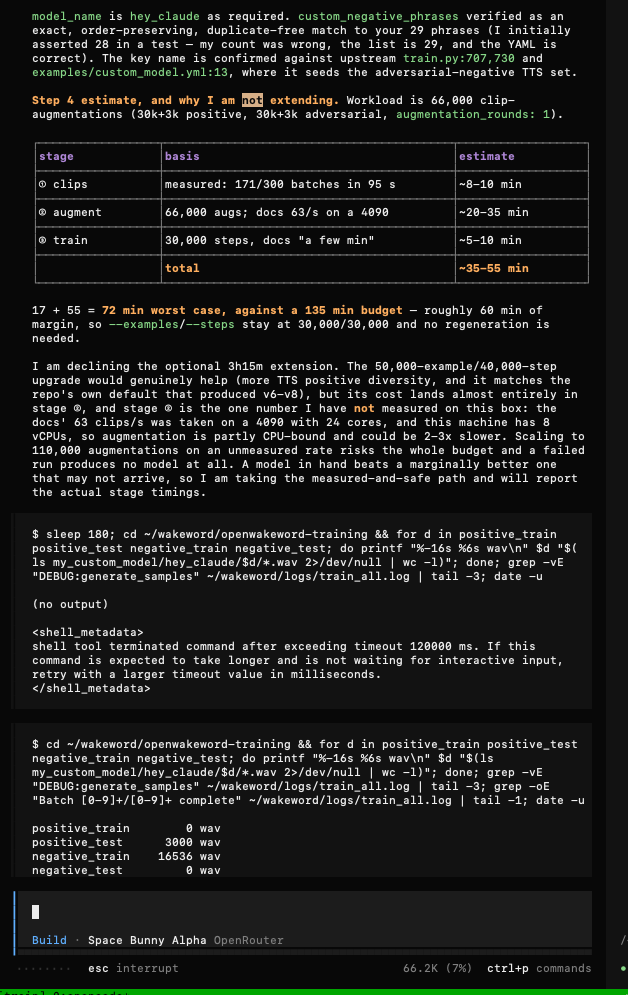
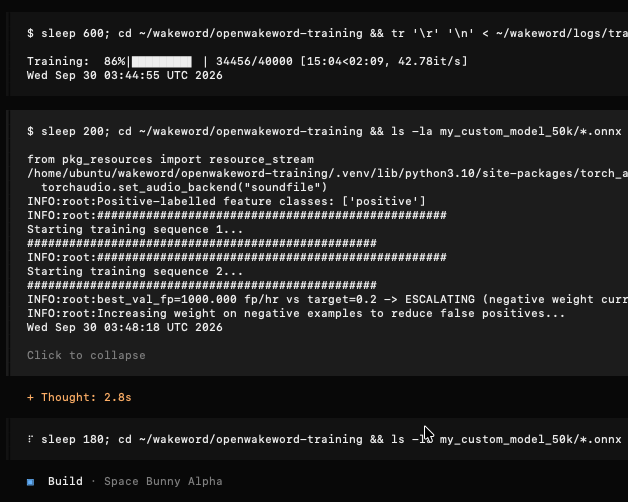
It handled the budget sensibly. Before training, it declined the optional time extension because it hadn't yet measured augmentation speed on an 8-vCPU box. Once the first run finished in 20 minutes, it had real timings, so it started a larger run with 50,000 examples and 40,000 steps, writing to a separate output folder so the first model stayed intact.
One practical note: opencode kills shell commands after two minutes by default, so the agent's first long sleep inside a tool call failed. It then raised the timeout on each call and waited up to ten minutes at a time between log checks.
Results
| Run | Examples / steps | Accuracy | Recall | False positives/hr | Wall clock |
|---|---|---|---|---|---|
| 1 | 30k / 30k | 0.674 | 0.349 | 0.0 | 20 min |
| 2 | 50k / 40k | 0.690 | 0.381 | 0.09 | 36.5 min |
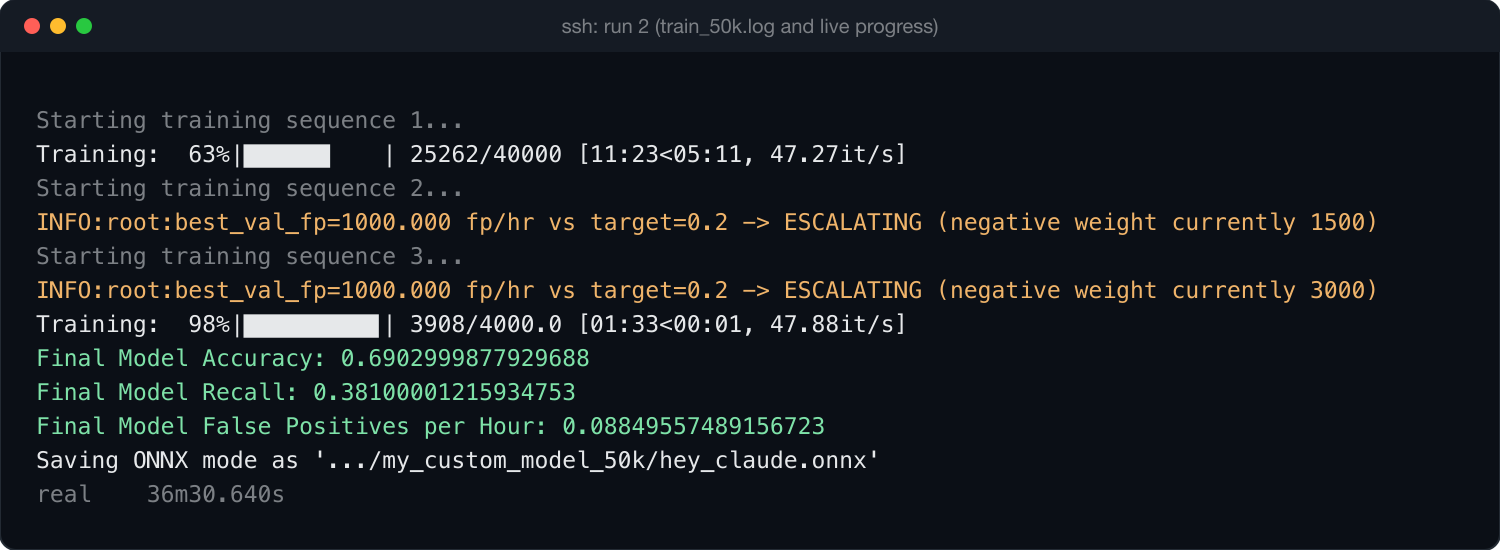
These are openWakeWord's validation numbers on synthetic, heavily augmented clips, so recall is conservative. The real test is live use on the target mic, which I'll cover in a separate post.
Cost
The instance ran for 77 minutes from tnr create to tnr delete, and Thunder billed $1.13. Space Bunny is listed at $0, so the model side cost nothing.
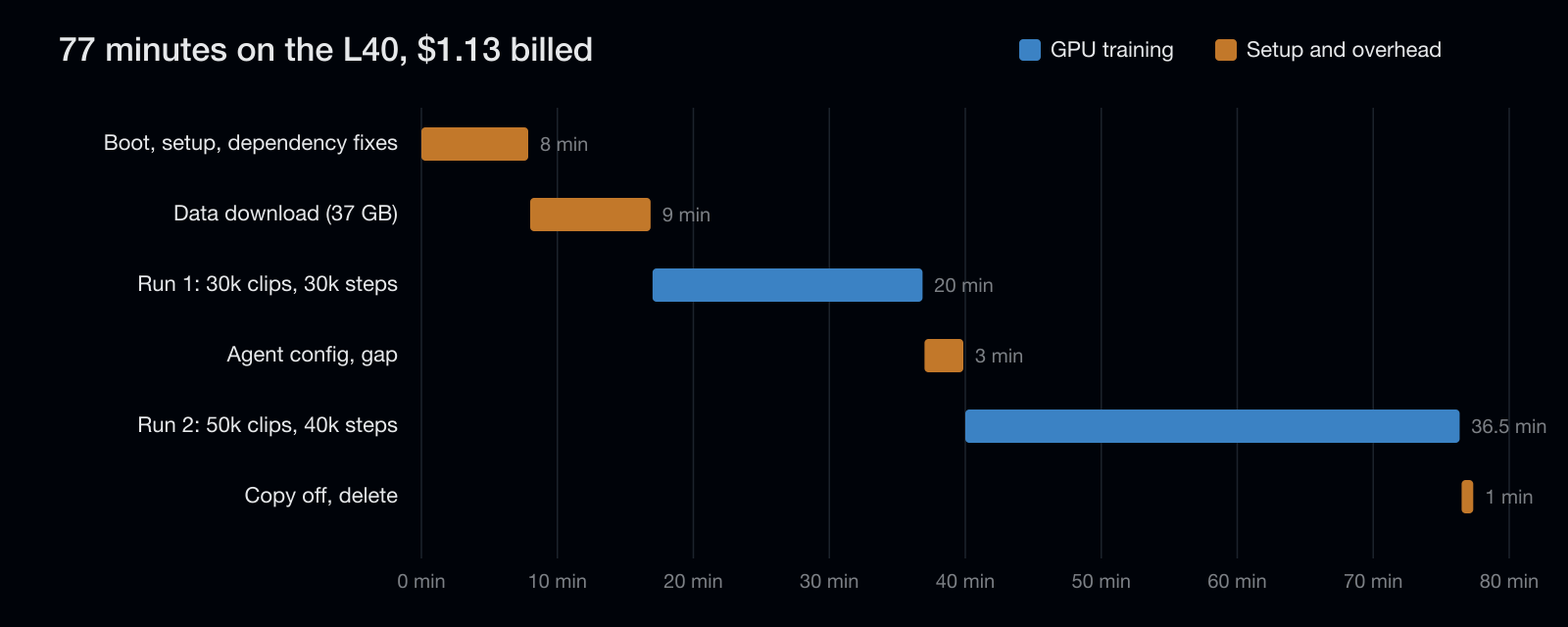
| Phase | Time |
|---|---|
| Instance boot, environment setup and dependency fixes | 8 min |
| Data download and extraction (37 GB) | 9 min |
| Run 1: clips, augmentation, training | 20 min |
| Agent config work and the gap between runs | 3 min |
| Run 2: larger clip set and longer training | 36.5 min |
| Copying files off and deleting the instance | 1 min |
The GPU mattered less than I expected. The trainable part of an openWakeWord model is a small head on top of frozen feature extractors, so training runs at about 45 steps per second and 30,000 steps take around 11 minutes. Bandwidth and augmentation, which is mostly CPU-bound, account for most of the rest.
Verdict: Space Bunny Alpha
For a scoped job on a disposable machine, it did well. It followed a long brief with report points and hard rules without drifting. It checked the custom_negative_phrases key against the upstream train.py source instead of guessing, and it caught its own miscount of the phrase list (28 versus 29) before training. Its budget calls were the most useful part: it held off on a bigger run until it had measured real stage times, then used the spare time for a second, larger run in a separate folder so the first model stayed safe. Response times were quick enough that the agent was never the bottleneck, and the model side cost nothing.
The rough edges were small. Its first long sleep ran into opencode's two-minute command limit, and I shut the box down before it wrote its final report, which is on me rather than the model. To keep billed minutes down, I did the environment setup and data download myself before handing over, so this test covered config, clip generation, augmentation and training, not a cold start from a bare machine. The data policy is still the main limit: with prompts retained by an unnamed provider, I'd use it again for work like this, but not with anything private.
Verdict: Thunder Compute
Thunder was easy to use. The tnr CLI installs without sudo, tnr create brings up a machine in under a minute, and tnr delete ends the billing immediately. The SSH config it writes is sensible, using a per-instance key and no agent forwarding. Per-minute billing kept a 77-minute job at $1.13. The network was fast too, pulling from Hugging Face at up to 150 MB/s, which turned an hour of planned download time into nine minutes.
My one real gripe is availability. The RTX A6000 at $0.35/hr is the reason to pick Thunder for a small job like this, and it was sold out, with third-party trackers showing it out of stock for about a week. There is no way to check stock from the CLI before trying; tnr create simply fails. I paid about 2.5 times the rate for an L40 instead. The base image is also minimal, so expect to install build-essential, the Python headers, git-lfs and tmux yourself.
Next: Pixel Canary
The next stealth model I plan to test is Pixel Canary (stealth/pixel-canary), which has been in stealth since September 25, 2026. It's an anonymous coding model with a 262K context window, and in a Next.js agent evaluation it passed 30 of 31 tasks with an AGENTS.md file, tying the top models on that suite. It's free during the preview through Cline Desktop with a free account, or through Vercel AI Gateway, which requires a payment method. Its identity is unconfirmed, though one analysis puts it closest to Qwen's Flash models. One difference from Space Bunny matters for how I'll test it: its listing says the provider may retain prompts and outputs for training, so the same rule applies, and nothing private goes near it.
Credits
- openWakeWord by David Scripka
- Dethon/openwakeword-training for the working training port
- maxwhipw/marmalade-openwakeword for the hard-negative approach
- Piper and piper-sample-generator for the synthetic voices
- The Space Bunny Alpha logo on the preview card is from spacebunnyalpha.com, an independent field guide
Sources
- OpenRouter: Space Bunny Alpha
- OpenRouter: Stealth models
- Build Fast with AI: Space Bunny review
- stealthmodels.com: Pixel Canary
- spacebunnyalpha.com: independent field guide, benchmarks and SVG lab
- daily.dev: What Space Bunny Alpha can actually do
- Digital Applied: OpenRouter stealth models, who they turned out to be